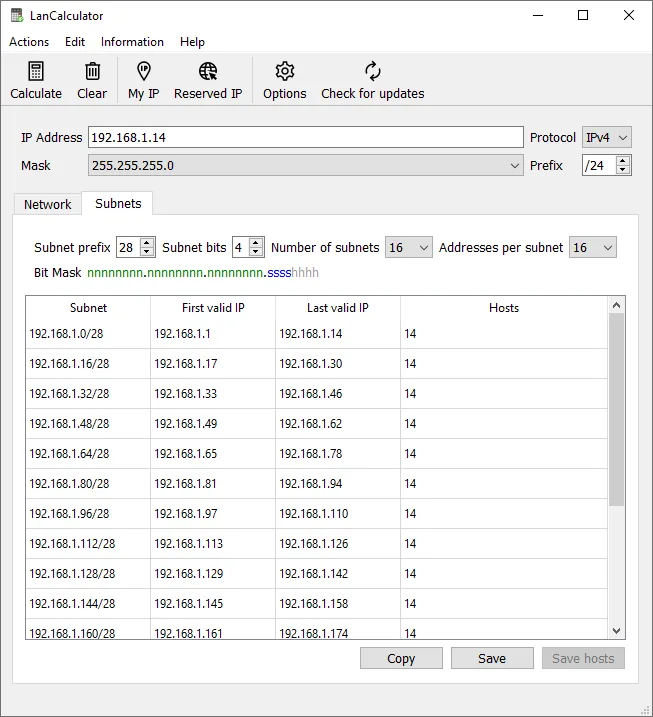
A new branch office needs a user VLAN for about 60 staff, a voice VLAN, a printer and IoT segment, a small server range, point-to-point links to two ISPs, and room to grow — all carved from a /22 that head office has already assigned. You can do the arithmetic in your head, or on a whiteboard, and most admins can. But the mistakes that end up in an IPAM are rarely hard maths; they are overlaps, an off-by-one broadcast address, or a /26 that was meant to be a /25. LanCalculator is a desktop tool for doing that planning step deliberately, before anything is typed into phpIPAM, NetBox, or a switch config.
What it is
LanCalculator is a Windows application from LizardSystems, the vendor also behind Network Scanner. It is an IP subnet calculator and planner covering both IPv4 and IPv6. The current version at the time of writing is 22.01, released on 15 January 2022. That release moved the program to Qt 6.2.2 and added a digital signature to the program files; the previous major version (2.0.57, July 2019) was a full rewrite in Qt that introduced subnet planning and IPv6 support.
The vendor’s FAQ lists support for 64-bit Windows: Windows 10, Windows 11, and Windows Server 2012 R2, 2016, and 2019. Administrator rights are required to install it, and internet access is needed only for registration and update checks.
What it does
The vendor describes the following capabilities, all of which are aimed at the planning phase:
- IPv4 and IPv6 calculations from an address plus either a subnet mask or a prefix length — you can type
255.255.255.192or/26, whichever your team habitually uses. - Subnet parameters: network address, broadcast (for IPv4), usable host range, and host count.
- Subnet planning, for dividing a larger block into smaller networks.
- Multiple number bases: addresses shown in binary, octal, decimal, and hexadecimal. The binary view is the practical one — it makes it obvious where a mask boundary falls and why 10.20.4.0/23 cannot start at 10.20.5.0.
- Reverse DNS names for addresses, useful when preparing PTR zones.
- Export of address and subnet lists, so the plan can be handed to whoever enters it into the register.
A worked example of the kind of plan it is meant to help with, using that /22 from the introduction (10.40.8.0/22):
| Purpose | Prefix | Range | Usable hosts |
|---|---|---|---|
| Users | 10.40.8.0/25 | .8.1 – .8.126 | 126 |
| Voice | 10.40.8.128/26 | .8.129 – .8.190 | 62 |
| Printers / IoT | 10.40.8.192/26 | .8.193 – .8.254 | 62 |
| Servers | 10.40.9.0/27 | .9.1 – .9.30 | 30 |
| Growth | 10.40.9.32 – 10.40.11.255 | — | reserved |
Allocating largest-first, on natural boundaries, keeps every subnet aligned and leaves one contiguous block for growth. The full reasoning, including VLAN numbering, is in our guide to planning subnets for a new site.
Where it’s strong
- Offline and immediate. No server, no browser tab, no sign-in; useful on a jump host or a laptop in a comms room with no internet.
- IPv6 alongside IPv4. Handy for dual-stack planning, where mentally splitting a /48 into /56s and /64s is error-prone.
- Mask or prefix input. Admins who think in dotted masks and those who think in CIDR can use the same tool.
- Exportable output. Plans can move from calculator to register without retyping.
- Signed binaries and published hash. Since 22.01 the program files are digitally signed, and the vendor publishes a SHA-256 checksum.
Where it falls short / who should skip it
It is a calculator, not an IPAM. It does not know what is already allocated, does not scan, and does not remember a plan across sessions the way a register does. It helps you design the plan; phpIPAM, NetBox, or GestióIP must hold it — and phpIPAM and NetBox both show free space inside a parent prefix, which covers much of the same ground once a block is in the register.
It is Windows-only, and the last release is from January 2022. The supported list does not mention Windows Server 2022 or 2025.
Many admins will also find free alternatives sufficient: ipcalc or sipcalc on Linux, PowerShell snippets, or the subnet views inside their IPAM. The business licence price is modest, but paying for a calculator is a harder sell if your IPAM already does the job.
Who it suits
Windows-based admins who plan subnets several times a year — new sites, VLAN re-designs, IPv6 rollouts — and want a dedicated, offline tool with a binary view and exportable plans. It is also a good teaching aid for junior staff learning why subnets must align on bit boundaries.
Licensing and cost
At the time of writing LizardSystems offers a free Personal licence for non-commercial use (perpetual) and a Business licence at US$49.95 per licence, perpetual, with one year of free updates and email/ticket support. The FAQ describes an unregistered evaluation with no functional limits that is restricted to one computer on the network and shows reminder screens. Volume and site licences are available by contacting the vendor. Check the vendor’s current pricing page before buying.
How it compares
Within the subnet planning category, LanCalculator is the only dedicated desktop calculator; the other entries are IPAM platforms with planning features built in. If you are choosing an IPAM to receive the plan, phpIPAM vs NetBox is the place to start.
Getting it safely
Get LanCalculator from the vendor’s product page at lizardsystems.com. For version 22.01 the vendor publishes this SHA-256 value: 40654342f5a3d96f0865d5518dc09fc1f2fb0fb00d8e41f09536095806dac653. Check it in PowerShell before running:
Get-FileHash .\<file-you-obtained>.exe -Algorithm SHA256Also confirm the digital signature under the file’s Properties → Digital Signatures. Our where to get software page explains our linking policy.
FAQ
Is LanCalculator free?
Free for personal, non-commercial use. Business use requires a paid licence per machine.
Does it support IPv6?
Yes. IPv6 calculations and planning have been supported since version 2.0.57 in 2019.
Is Windows 11 supported?
Yes. For version 22.01 LizardSystems names Windows 11 as supported, alongside Windows 10 and Server 2012 R2, 2016, and 2019.
Can it check whether addresses are in use?
No. It only calculates and plans. Use a scanner such as Angry IP Scanner or your IPAM’s discovery for that.