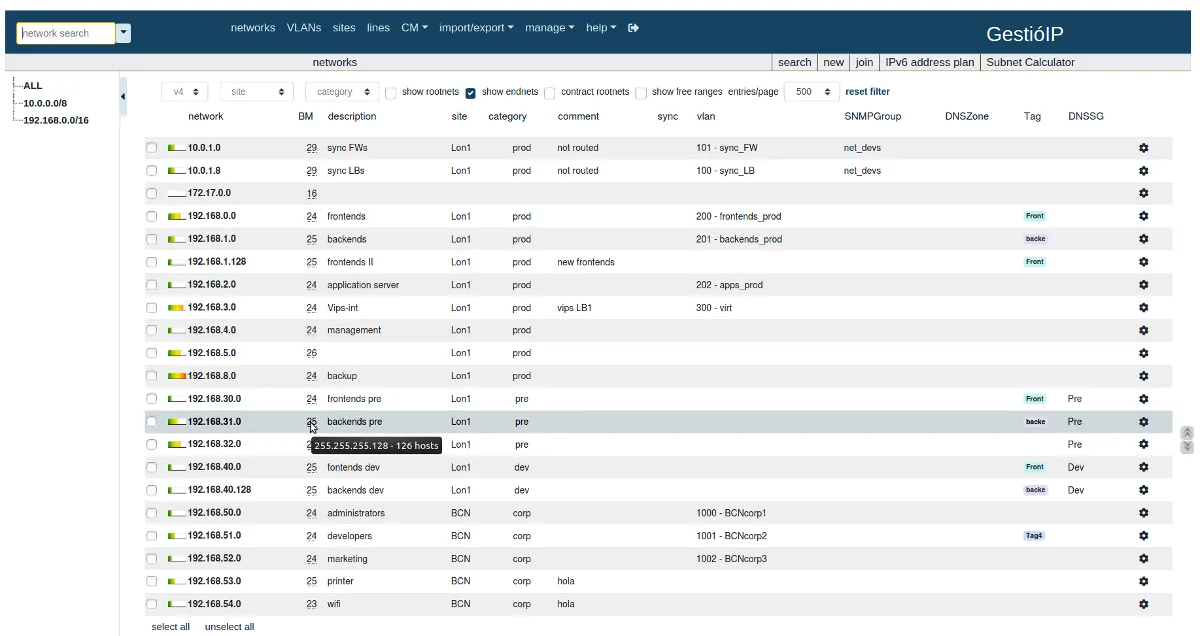
Picture inheriting a network from a predecessor who left no documentation: four sites, a core switch doing inter-VLAN routing, a couple of branch routers, and no idea which /24s exist beyond the ones people complain about. Before you can reconcile a plan with reality, you need a plan. GestióIP’s distinctive trick is building that first draft for you — it can read the routing tables of your layer-3 devices over SNMP and import the networks it finds, then sweep each one for hosts.
What GestióIP is
GestióIP (the accent is part of the name; you will also see “GestioIP”) is a web-based IP address management application published as free, open-source software; the licence text shipped in the source tree is the GNU GPL v3. It is written in Perl and runs on a Linux server with Apache and a MySQL or MariaDB database. The project’s site lists version 3.5.13 as the current release at the time of writing (announced June 2025), and the project site also points to a Docker Compose deployment for those who prefer containers.
Its developers sell support, installation, custom development, and training, and some capabilities — notably the API for other applications — are described on the project site as commercial features. The core IPAM is free to use.
How it builds and checks the record
GestióIP leans on discovery more than most free IPAMs:
- Network discovery from routing tables. Point it at routers or layer-3 switches with SNMP read access (UDP 161), and it imports the connected and routed networks it finds. For an undocumented estate this is the fastest way to get a complete subnet list.
- Host discovery via ping, DNS, and SNMP. Each network can then be swept; hosts are found by ICMP, by forward/reverse DNS lookups against your resolvers, and by SNMP queries to devices that answer.
- VLAN discovery via SNMP. VLANs are read from switches and kept in an integrated VLAN manager, so VLAN IDs and names line up with the subnets they carry.
- Scheduled jobs. Discovery can run on a schedule, which turns a one-time import into ongoing reconciliation — new hosts appear, and addresses that stop answering are visible.
On top of that, GestióIP offers full IPv4 and IPv6 support, including a hierarchical IPv6 addressing plan builder for carving a /48 into site and VLAN prefixes, and a configuration-management module that backs up the configs of switches and routers — useful for tying an address change to the device config that implemented it.
A realistic first run on your own network looks like this: create SNMP credentials on the core router, add it as a discovery target, let GestióIP import the network list, review and prune what it found (loopbacks, point-to-point /30s, and transit links you may not want as full subnets), then schedule host discovery on the user and server networks.
Where it’s strong
- Bootstrapping from nothing. Routing-table import is uncommon in free IPAMs and saves real time on an undocumented network.
- DNS-aware. Using DNS as a discovery source means hostnames are populated from the start, which makes the register readable.
- IPv6 planning. The IPv6 plan builder is a genuine help for teams starting dual-stack rollouts.
- Config backups. Having device configs next to the address register is handy for smaller teams without a separate config-backup tool.
- No licence meter. Free and open source, with paid help available if you want it.
Where it falls short / who should skip it
The community is smaller than phpIPAM’s or NetBox’s, which means fewer third-party integrations, fewer blog posts, and slower answers on forums. If you need a large ecosystem, NetBox is the safer bet.
The interface is functional rather than modern, and some translations and documentation read unevenly. Expect to consult the installation guide (published as a PDF on the project site) rather than finding a quick answer online.
Programmatic integration is a sticking point: because the API is positioned as a commercial feature, automation-heavy teams may find phpIPAM’s free REST API or NetBox’s API a better match.
It does not manage DHCP servers. If scope exhaustion is your main problem, SolarWinds IPAM or Micetro address it directly. And SNMP-driven discovery only works if your network team allows SNMP from the GestióIP server; locked-down environments limit it to ping and DNS.
Who it suits
Admins inheriting an undocumented routed network, small and mid-size teams comfortable with a Linux/Perl/MySQL server, and organisations planning IPv6 who want a free tool that helps with the addressing plan. It also fits teams that value discovery over data-centre modelling.
Licensing and cost
Free and open source (GPL v3 in the source distribution). Commercial support, installation, custom development, and training are available from the developers, and the API is described as a commercial feature; check the project site for current terms and whether your use needs it.
How it compares
Among free self-hosted tools, GestióIP sits between phpIPAM (simpler, larger community, free API) and NetBox (deeper model, no built-in scanning); the trade-offs between the latter two are laid out in phpIPAM vs NetBox. If you are designing a fresh address plan rather than discovering an old one, start with our guide to planning subnets for a new site. Browse the address discovery category for scanner-first tools.
Getting it safely
Get GestióIP from the project’s own site (gestioip.net) or the project page it links to, and follow the version-matched installation guide. If you use Docker Compose, check who publishes the images and pin a version. Our where to get software page describes how we link only to vendor and project sources. Point discovery only at networks and devices you are authorized to query.
FAQ
Is GestióIP really free?
The IPAM software is free and open source. Support, installation help, custom work, training, and the API are offered commercially by the developers.
What do I need to run it?
A Linux server with Apache, Perl, and MySQL or MariaDB, or a Docker host using the Compose deployment the project references.
Does it support SNMPv3?
GestióIP uses SNMP for network, host, and VLAN discovery; check the current installation guide for the SNMP versions and security options supported in your release.
Can it import my existing spreadsheet?
It supports importing networks and hosts from spreadsheet files, which you can combine with discovery to fill gaps.