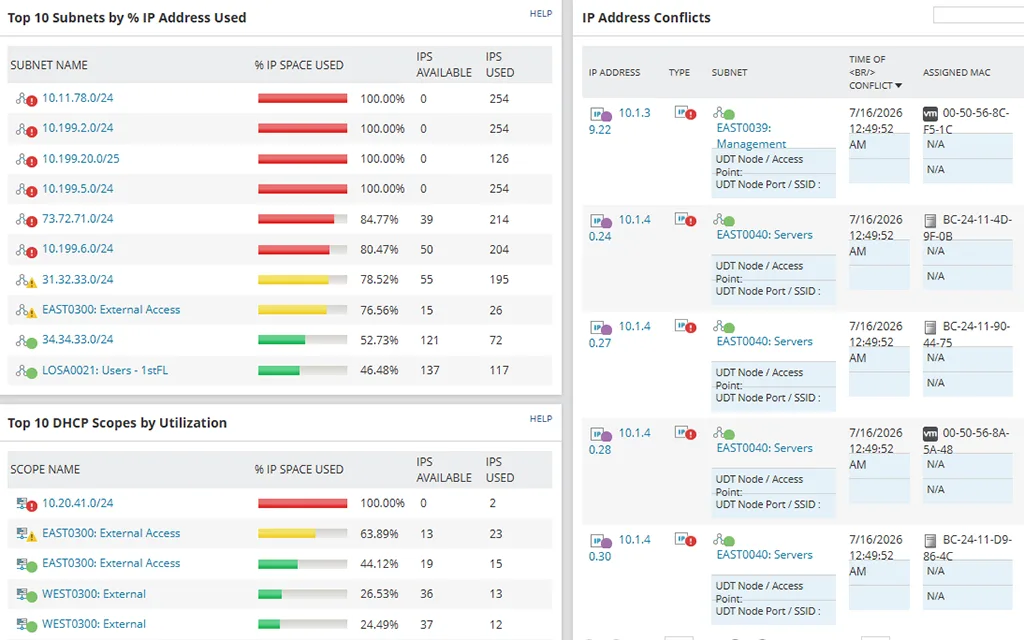
Monday, 8:40 a.m.: the helpdesk queue fills with “no network” tickets from the third floor. The cause, once found, is dull — the 10.40.12.0/24 scope on a Windows DHCP server ran out of leases over the weekend because a batch of new laptops arrived with randomised MAC addresses. Nobody was watching scope utilisation, and the IP spreadsheet had no idea DHCP even existed. SolarWinds IP Address Manager is aimed squarely at this kind of morning: it ties the address register to the DHCP and DNS servers that actually hand addresses out.
What it is
SolarWinds IP Address Manager (IPAM) is a commercial module that runs on the SolarWinds Platform — the same Windows-based framework formerly branded Orion, which also hosts Network Performance Monitor and other modules. SolarWinds now also positions IPAM’s features as part of its Observability Self-Hosted offering. At the time of writing the current release is IPAM 2026.2.3.
The server side is Windows-only: the 2026.1 system requirements list Windows Server 2012 R2 through Windows Server 2025, with a Microsoft SQL Server database (2016 through 2022; SQL Express is permitted for evaluation only). Plan a dedicated VM and a SQL instance you are prepared to back up and maintain.
How it keeps plan and network in agreement
IPAM combines three data sources into one view:
- Subnet scanning. It polls the subnets you define on a schedule (five minutes by default for polling jobs, adjustable), using ICMP and SNMP. SNMP against routers and switches lets it pull ARP and neighbour data, so it can see a host even if that host ignores ping — provided your network gear allows SNMP reads from the IPAM server (UDP 161).
- DHCP servers. The vendor lists Microsoft, ISC, Kea, Cisco, and Infoblox DHCP. IPAM reads scopes and leases, shows utilisation, alerts on thresholds, and can create reservations and scopes from its own console. The 2026.1 release added Kea DHCP reservation support.
- DNS servers. Zones and records on supported platforms (again Microsoft, ISC/BIND, Kea, Cisco, and Infoblox per the vendor) can be viewed and edited, so the A/PTR record and the IPAM entry stay together.
Conflict detection then compares these sources — for example, an address recorded as available that is answering on the wire, or the same address appearing against two different MAC addresses. With the 2026.2 release the vendor also extends coverage to Azure virtual networks and their subnets, which helps teams with hybrid address space.
Windows DHCP and DNS are typically managed via WMI/RPC with a service account holding DHCP Administrators and DnsAdmins rights; firewall paths from the SolarWinds server to each DHCP/DNS server need to allow those management protocols.
Where it’s strong
- DHCP visibility. Scope utilisation graphs and thresholds catch the “scope ran dry” failure before users do. This is the feature most spreadsheet refugees actually want.
- One console across vendors. Mixed estates — Windows DHCP at HQ, Kea at a branch, Infoblox in the data centre — are shown in one tree.
- Platform reuse. If you already run NPM or other SolarWinds modules, IPAM shares the same web console, accounts, alerting engine, and reports, and adds little new infrastructure.
- Delegation. Role-based access lets you give the helpdesk read or reserve rights on specific subnets without handing them the DHCP console.
Where it falls short / who should skip it
Cost and weight come first. IPAM is licensed by the number of managed addresses (counted as used, reserved, or transient — unused addresses do not count, and IPv4 and IPv6 count the same), and pricing is by quote. For a single site with one /23, that is a lot of platform for the problem.
It is Windows and SQL Server all the way down on the server side. Linux-first teams will find the footprint alien, and the platform needs regular patching and version upgrades; older IPAM releases have published end-of-life dates, so staying current is not optional.
The SolarWinds Platform is also a high-value target on any network. Keep it off the internet, restrict who can log on, and apply updates promptly — this is standard hygiene for any central management server, but it matters more for one holding SNMP and DHCP admin credentials.
Finally, it is not a data-centre modelling tool. Racks, cables, and interface-level documentation belong in something like NetBox.
Who it suits
Mid-size organisations with Microsoft DHCP/DNS at the core, several sites, and at least one admin comfortable owning a Windows application server plus SQL. It is especially natural for teams already paying for other SolarWinds modules.
Licensing and cost
At the time of writing, SolarWinds licenses IPAM by managed IP address count, sold through a quote, and states that Observability Self-Hosted licences are multi-year contracts billed annually. A 30-day fully functional trial is offered. List prices are not published on the product page, so check the vendor’s current pricing and quote pages before budgeting.
How it compares
The obvious alternative in the same budget conversation is ManageEngine OpUtils, compared directly in SolarWinds IPAM vs ManageEngine OpUtils. OpUtils is lighter, adds switch-port mapping, and offers a small free edition. If DNS/DHCP orchestration is the core requirement across many server vendors, Micetro is the more specialised overlay. For the policy side of static versus reserved addresses, see our guide on DHCP reservations vs static IPs. All tools are listed in the IPAM software category.
Getting it safely
Get the evaluation from solarwinds.com via the IP Address Manager product page, or through your SolarWinds customer portal if you already hold a licence. Check that the files are signed by SolarWinds before running them, and compare any hashes the customer portal publishes. Our where to get software page covers this approach.
FAQ
Does SolarWinds IPAM require Network Performance Monitor?
No. IPAM can be deployed on the SolarWinds Platform on its own, though it shares infrastructure with other modules if you run them.
Which DHCP servers can it manage?
Per the vendor at the time of writing: Microsoft, ISC, Kea, Cisco, and Infoblox. Confirm your exact versions against the current system requirements.
How are addresses counted for licensing?
Addresses in used, reserved, or transient status count; unused addresses and a subnet’s network and broadcast addresses do not.
Is there a free version?
There is a 30-day trial. SolarWinds does not advertise a permanent free edition of IPAM.