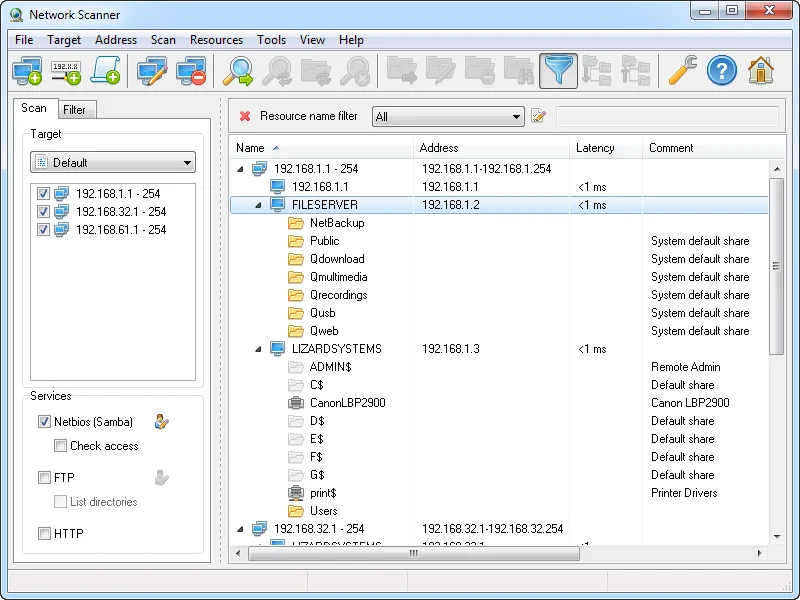
A file server was retired last quarter, but three departments still have mapped drives pointing at its address — and that address is now marked free in the register. Before handing it to a new appliance, you want to know two things about the surrounding range: which addresses are live, and which of them are still publishing Windows shares that someone depends on. LizardSystems Network Scanner is built around that second question, which most IP scanners treat as secondary.
What it is
Network Scanner is a Windows desktop application from LizardSystems, a small vendor of Windows network utilities. It scans lists of IP addresses, computer names, and IP ranges, determines which hosts are online, and enumerates the shared resources they expose — “including system and hidden NetBIOS (Samba) shared resources along with FTP and web resources”, in the vendor’s words. For each resource it can check read and write access for the current user or for credentials you specify.
The current version at the time of writing is 21.07, released on 7 July 2021. It is a 32-bit Windows program, and the vendor lists support for Windows 7, 8, 8.1, and 10 and Windows Server 2008 R2, 2012, 2012 R2, and 2016. That list stops short of Windows 11 and of Server 2019, 2022 and 2025; the program may well start on them, but the vendor has not confirmed it. Stated requirements are light: a 1 GHz CPU, 512 MB of RAM, and 50 MB of disk.
How it works on the wire
You add ranges using flexible expressions — the syntax 192.168.1-2,5,20,25-27.1-254 has been supported since version 4.0.199 — and choose which services to check (NetBIOS, FTP, HTTP). The scanner is multi-threaded; LizardSystems claims “thousands of computers per minute”.
Status is determined by ICMP ping, or by connecting to TCP ports you specify. That second option is the useful one on modern Windows networks where ICMP is blocked by default: telling it to test TCP 445 (SMB) or 3389 (RDP) finds hosts that ping-only scanners miss. This is an online/offline check, not a general-purpose port scanner.
For shares it relies on NetBIOS and SMB name and share enumeration (TCP 139/445), and for FTP and web resources on TCP 21 and 80. Results appear as a tree: host → resources, with Address, Latency, and Comment columns, and “First scan”/“Last scan” columns that show when a host was first and most recently seen by this program.
Found shares can be opened in Explorer, mapped as a network drive, or opened in a browser; hosts can be opened as a web, FTP, Telnet, or RDP target. Version 21.02 added remote shutdown and send-message tools to a configurable tools menu. Results export to HTML, TXT, or XML, and scans can be saved and reloaded. No administrator rights are needed to scan.
Where it’s strong
- Share and permission visibility. Listing hidden and administrative shares with an effective read/write check is genuinely useful when retiring servers or auditing who can write where on your own network.
- Works without ICMP. Port-based status checks handle firewalled Windows hosts.
- Simple deployment. A small Windows program with modest requirements; a non-admin install mode has existed since 2019.
- First/last seen columns. Within saved scans, these give a small taste of reconciliation history.
Where it falls short / who should skip it
The most important point first: there have been no releases since July 2021, more than five years at the time of writing. The supported OS list stops at Windows 10 and Server 2016. For a tool that talks SMB to every host on the segment, that age matters — protocol hardening in newer Windows releases (SMB signing requirements, disabling of SMBv1 and guest access) can change what it can enumerate, and there is no vendor statement about compatibility with current builds.
It is Windows-only. The vendor does not state MAC address or vendor detection, SNMP, IPv6 scanning, CSV export, or a command line, so it is not a good feeder for automated IPAM imports. If you need CSV output for a diff against phpIPAM or NetBox, Angry IP Scanner is the better fit.
It is also not an IPAM: it records what it saw, not what was planned. Pair it with a register rather than treating it as one.
Commercial users need a paid licence per machine, which is reasonable for one admin workstation but adds up across a team.
Who it suits
Windows administrators who periodically need to answer “what is still sharing what, and who can write to it” across their own ranges — for example before decommissioning a server, re-IPing a subnet, or tightening share permissions.
Licensing and cost
At the time of writing, LizardSystems offers a Personal licence that is free for non-commercial use and perpetual, and a Business licence at US$79.95 per machine, perpetual, including a year of free updates plus support by email or ticket. According to the FAQ, every machine it is installed on requires a licence of its own. The FAQ also describes an unregistered evaluation that is fully functional but limited to one computer on the network and shows reminders, while the vendor’s contact page mentions a 30-day evaluation for every product; how these two statements fit together is not fully spelled out, so read the current licence page before deploying commercially. Volume and site licensing are available by contacting the vendor. Check the vendor’s current pricing page before buying.
How it compares
The direct comparison is Angry IP Scanner vs LizardSystems Network Scanner: Angry IP is free, cross-platform, and more current; this tool goes deeper on Windows shares and access rights. For a structured pre-assignment check, our guide on finding free IP addresses in a subnet walks through combining a scanner with your register. More tools are in the address discovery category; the same vendor’s subnet calculator is reviewed at LizardSystems LanCalculator.
Getting it safely
Get Network Scanner only from the vendor’s product page at lizardsystems.com. The vendor publishes a SHA-256 checksum for version 21.07: 5421a6ddb26a2a9e56f7959e927d0f2158c0cfb44c55d4d2fee1c427ce63f8d6. Verify the file before running it:
Get-FileHash .\<file-you-obtained>.exe -Algorithm SHA256The output must match the published value exactly. See where to get software for our approach, and scan only networks you own or are authorized to assess.
FAQ
Is Windows 11 supported?
Not officially: LizardSystems leaves Windows 11 off its list of supported systems. It may run, but test it on a non-critical machine first and check that SMB enumeration still works against your current servers.
Is the free version allowed at work?
No. The free Personal licence is for non-commercial use; business use requires a Business licence per machine.
Can it find devices that block ping?
Yes, if you configure status checks against TCP ports those devices keep open, such as 445 or 3389.
Does it export to CSV?
The vendor lists HTML, TXT, and XML export. CSV is not stated.